Watch How It Works
See the actual workflow before you decide.
Word → PDF → Email
Images → PDF → Desktop
What This Tool Does
Automate repetitive document work
- Create PDFs from Excel or Word documents with one click
- Prepare email drafts with the PDF attached
- Save PDFs directly to your desktop when email is not needed
- Export images to multi-page PDFs via Word drag & drop
Designed for practical workflows
- Built for invoices, quotations, purchase orders, and similar documents
- Runs locally inside Excel / Word as a macro-enabled workbook
- Reduces manual steps and helps prevent attachment mistakes
- Better suited to business use than generic PDF conversion flows
Security Verified
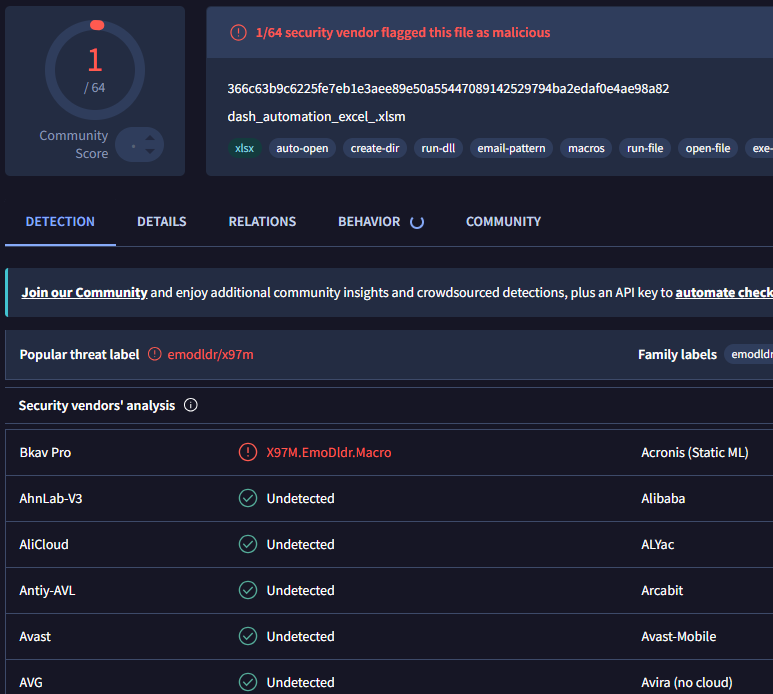
63/64 Clean on VirusTotal
Safety is our top priority. The tool is scanned by VirusTotal, and 63 out of 64 major security vendors (including Microsoft, Norton, Kaspersky, and Avast) have confirmed it is 100% safe.
Note on Detection: One minor vendor (Bkav Pro) flagged it. This is a false positive caused by the macro's ability to automate Outlook. Since this is an Excel Macro (.xlsm) and not a hidden executable (.exe), the code is transparent and runs entirely on your local machine.
Purchase Options
Starting with the trial is recommended. It lets you confirm that the workflow fits your environment before purchasing.
for 1 computer
$34
Lifetime license for one computer
- Best for individual use
- One-time purchase
- No subscription fee
Best Value • Limited-Time Offer
for 5 computers
Regular Price: $159
Limited-Time Price: $111
Lifetime license for up to five computers
- Best value for multiple workstations
- Suitable for small teams
- One-time purchase
for 2 computers
Regular Price: $64
Limited-Time Price: $61.2
Lifetime license for up to two computers
- For dual-PC personal use or a small shared setup
- One-time purchase
- No subscription fee
Why You Can Trust This Tool
- Created by an independent developer focused on Excel and Word workflow automation
- Runs entirely on your computer — no cloud access is required for the workflow itself
- Delivered as a macro-enabled workbook, not an executable program
- Secure payment is processed by Stripe
- Free support is currently available
- The trial option helps reduce purchase risk before you commit
PDFs: Optimized for Mobile & Recipients
- ✅ Mobile-Friendly: Recipients can view invoices or multiple photos instantly on smartphones without formatting issues.
- ✅ Lightweight Storage: PDFs are smaller than raw files, saving space on the recipient's device.
- ✅ Professional Courtesy: Sending one organized PDF is much more professional than multiple scattered attachments.
System Requirements
- Windows 10 or later
- Microsoft Office 2010 or later
- Outlook Classic is required only for automatic email preparation
PDF creation without email preparation is also supported.
Support
Free support is currently available.
If you have questions or need adjustments related to the macro workflow, you can contact us by email after starting the trial or purchasing a license.
FAQ
Do I need to install anything?
No. Just open the macro-enabled workbook.
Does it work without Outlook?
Yes. You can still create PDFs and save them to your desktop. Outlook Classic is required only for the email preparation workflow.
Is there a trial?
Yes. A 14-day free trial is available and is the recommended starting point.
Is the software safe?
The tool is delivered as a macro-enabled workbook and runs locally on your computer. It is not an executable application.
How many computers can I use with one license?
You can choose from 1 PC, 2 PC, or 5 PC license options depending on how many computers you want to use.